Showing posts with label LINQ. Show all posts

PLINQ: Set Degree of Parallelism using WithDegreeOfParallelism

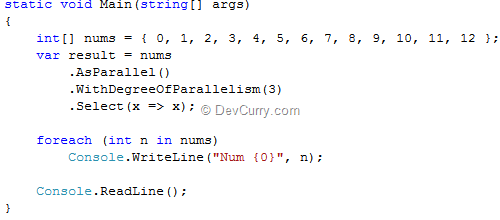
Degree of parallelism is the maximum number of ‘concurrently’ executing tasks that will be used to process the query. A query could become a long running one if it is waiting for a resource to be released or hardware to respond. PLINQ can parallelize this query by calling WithDegreeOfParallelism (which sets the maximum processor cores) after AsParallel().

AsParallel() method enables parallelization of a query.

The degreeOfParallelism is less than 1 or greater than 63. The WithDegreeOfParallelism method sets the degree of parallelism to use in a query. Let us see how to set the maximum number of processor cores to 3 using this method.

PLINQ Parallelism

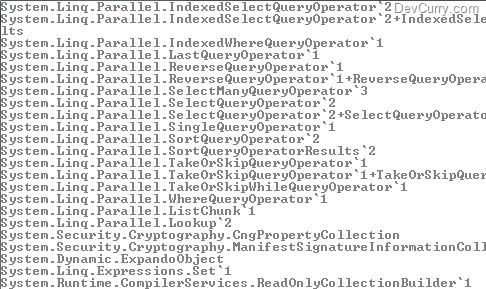
Depending on the number of cores you have, PLINQ may process that many chunks of data at once. So if you have a quadcore machine, it would be 4 threads. However remember that specifying WithDegreeOfParallelism as 8 on a quad core machine wouldn't really improve performance because only 4 threads could be active at the same time. Having said that, for File I/O ops, I usually specify a number greater than the number of cores.

50 LINQ Examples Now in LINQPad

I had recently written an article on 50 LINQ Examples, Tips and How To's.

Software Developer and geek John Flynn took these examples and did a great job compiling  these queries into a format which can be executed using LINQPad.


LINQPad is a FREE tool that can execute any C#/VB/F# expression, statement block or program with rich output formatting. It’s a must have for every .NET developer using LINQ. The Free version does not have autocompletion. Download the Free Version of LINQPad.

Assuming you have installed LINQPad, select the Sample Tab and click on the ‘Download more samples..’ link. Enter the file path to the LINQ Examples zip file that you just downloaded.

LINQ Pad

That’s it. You can view and execute all these LINQ examples now in LINQPad.

LINQPad

All you have to do is click a query to select it and hit F5. Make sure ‘C# Program’ is selected in the Language dropdown. The results are shown below.

LINQPad

Once again, thanks to John Flynn for compiling my LINQ queries as a download. I am sure like me, other fellow developers will appreciate his efforts and make maximum use of it by downloading this zip file! Feel free to give feedback on the LINQ queries.

Cheers to our dev community!

LINQ: Generate Odd Numbers using Parallel Execution

A couple of months ago, I had written on Generate Odd Numbers within a Range using LINQ. In that post, I had demoed how to ‘sequentially’ generate odd numbers within a Range. However what if you have to generate a large set of numbers and are not interesting in generating the numbers in a sequence, you can use Parallel Execution. The ParallelEnumerable.Range() is just the right method for this requirement which generates a parallel sequence of integer numbers. Let’s see an example:

static void Main(string[] args)
{
  IEnumerable<int> oddNums 
     = ((ParallelQuery<int>)ParallelEnumerable.Range(20, 2000))
  .Where(x => x % 2 != 0)
  .Select(i => i);

  foreach (int n in oddNums) { Console.WriteLine(n); }
  Console.ReadLine();
}

The code more or less remains the same as demoed in my previous article. However there’s an important observation to make - the cast to a ParallelQuery<int>. It is this casting that creates a parallel execution instead of a sequential one.

Run the application, and as you can see, the odd numbers are generated parallel, in no particular oder.

image

LINQ: Compare two Sequences

How do you compare two sequences using LINQ? The answer is by using the Enumerable.SequenceEqual(). SequenceEqual() compares the source and target sequences elements, by using the default equality comparer for their type, and returns a Boolean.


There are many ways to use the SequenceEqual() extension method – like to compare the files in two folders and see if they contain the same files. Let us see a simple example of using the SequenceEqual() extension method

LINQ SequenceEqual

The output will be: False

Now what if you want to find out the difference between these two sequences?. Use this piece of code which uses the IEnumerable.Except extension method:

LINQ Except

OUTPUT

LINQ Compare Sequences

LINQ: Calculate Average File Size in C#

Let us see a simple code using LINQ and C# that calculates the average FileSize of the files kept in a folder.

First import the following namespaces:

using System.Linq;
using System.IO;


Then write the following code:

class Program
{
 static void Main(string[] args)
 {
  string[] dirfiles = Directory.GetFiles("c:\\software\\");            
  var avg = dirfiles.Select(file =>  
                  new FileInfo(file).Length).Average();
  avg = Math.Round(avg/1000000, 1);
  Console.WriteLine("The Average file size is {0} MB",
   avg);
  Console.ReadLine();
 }
}

The code shown above uses the Average Extension method to compute the average of a sequence of' numeric values. The values in this case is the length of the files in the folder “c:/software”. The result is rounded off to one decimal place using Math.Round

OUTPUT
 LINQ Average File Size

List<T>.ConvertAll<>() with Lambda Expression

List<T> has many useful methods for dealing with sequences and collections. One such method is the ConvertAll<>() method. All those who have used the List<T>.ConvertAll<>() are aware how useful this method is to convert the current List<T> elements to another type, and return a list of converted elements. However, an instance of a conversion delegate must be passed to this method, which knows how to convert each instance from the source type to the destination type.

For eg: Convert a List<int> to List<string>

ConvertAll with Delegate

However combined with a Lamda Expression, this method can be used to write terse code.

Here’s an example. Let us say we want to rewrite the same code shown above which converts a List<int> to List<string> in the shortest possible way

ConvertAll with Lambda

Add a breakpoint, debug the code and you will see that ConvertAll<>() converted the List<int> to List<string>.

ConvertAll with Lambda

Note: Since ConvertAll() creates a new collection, sometimes this may be inefficient.

LINQ: Generate a Cartesian Product

A Cartesian product by definition is a direct product of two sets. Take the following example. Assume you have these two lists:

{A, B, C} and {1, 2, 3}

A Cartesian product of the two lists would be the following:

{(A,1), (A,2), (A,3), (B,1), (B,2), (B,3), (C,1), (C,2), (C,3)}

Let us see how to achieve something similar in LINQ using the SelectMany method

LINQ Cartesian

Needless to say, this peice of code is the key to generating cartesian product in LINQ:

var cartesianLst = 
listA.SelectMany(a => listB.Select(b => a + b + ' '));

using which we are projecting each element of a sequence to an IEnumerable< T> ; projecting to a result sequence, which is the concatenation of the two.

OUTPUT

LINQ SelectMany
Also check out Combine Multiple Sequences in LINQ using the Zip Operator - .NET 4.0

LINQ: List Classes implementing the IEnumerable Interface

A DevCurry.com reader ‘Richard’ mailed me with a question. He wanted to know an easy way to find all the types that implement the IEnumerable interface, or for that matter, any interface. Here’s a piece of LINQ code that lists all the types implementing the IEnumerable interface

public static void Main(string[] args) 
{ 
   var t = typeof(IEnumerable); 

   var typesIEnum = AppDomain.CurrentDomain
  .GetAssemblies()
  .SelectMany(x => x.GetTypes())
  .Where(x => t.IsAssignableFrom(x)); 

foreach (var types in typesIEnum) 
{
 Console.WriteLine(types.FullName); 
}
Console.ReadLine(); 
}

Here’s a partial output

types implementing interface

Note: The results may not be the same on your machine. Note that we are referring to the GetExportedTypes() which returns type visible outside the assembly. So if you have added new references (assemblies) to your project which implements the IEnumerable or changed the access modifiers of your custom types, you will get different results.

Liked this tip? Read some more LINQ Tips

Select Last N elements using LINQ to XML

Here’s a simple example of selecting the last ‘N’ elements of a XML document using LINQ to XML

Consider the following XML

image

In order to select the last two elements, use the IEnumerable<XElement>.Reverse() which inverts the order of the elements in a sequence, and use Take(2) to return 2 elements, as shown in the following code:

static void Main(string[] args)
{
// code from DevCurry.com

XDocument xDoc = XDocument.Load("..\\..\\School.xml");
var students = xDoc.Descendants("Class").Reverse().Take(2);
foreach (var student in students)
Console.WriteLine(student.Element("Student").Value +
" " + student.Element("Name").Value);
Console.ReadLine();
}

OUTPUT

image

Find Uppercase words in a String using C#

I am helping a friend to build an Editor API in C#. One of the functionalities in the Editor is to filter uppercase words in a string and highlight them. Here’s a sample of how uppercase words can be filtered in a string

static void Main(string[] args)
{
// code from DevCurry.com
var strwords = FilterWords("THIS is A very STRANGE string");
foreach (string str in strwords)
Console.WriteLine(str);
Console.ReadLine();
}

static IEnumerable<string> FilterWords(string str)
{
var upper = str.Split(' ')
.Where(s => String.Equals(s, s.ToUpper(),
StringComparison.Ordinal));

return upper;

}

The code shown above is quite simple. The FilterWords method accepts a string, uses the Split() function to split the string into a string array based on a space delimiter and finally compares each string to its upper case. All the matches are then returned to the caller function.

OUTPUT

Uppercase string filter

LINQ: Query Comma Separated Value (CSV) files

In this post, we will read a Comma Separated Value (CSV) file using LINQ and perform some calculations on the data.

Create a Console Application. Right click the project > Add > New File > Select a text template and rename it to Sample.csv. Add the following data in the CSV file

csv file

The data shown above shows Quarter wise sales by each SalesPerson. There are 5 columns. The first column is the SalesPersonID and the rest represents total items sold by the salesperson in each quarter.

We will now use LINQ to query this data. Write the following code:

using System;
using System.Linq;
using System.IO;
using System.Collections.Generic;

namespace CSVLINQ
{
class Program
{
static void Main(string[] args)
{
IEnumerable<string> strCSV =
File.ReadLines(@"../../Sample.csv");
var results = from str in strCSV
let tmp = str.Split(',')
.Skip(1)
.Select(x => Convert.ToInt32(x))
select new {
Max = tmp.Max(),
Min = tmp.Min(),
Total = tmp.Sum(),
Avg = tmp.Average()
};

// caching for performance
var query = results.ToList();

foreach (var x in query)
{
Console.WriteLine(
string.Format("Maximum: {0}, " +
"Minimum: {1}, " +
"Total: {2}, " +
"Average: {3}",
x.Max, x.Min, x.Total, x.Avg));
}

Console.ReadLine();
}
}
}

Shown above is an example that calculates the Max, Min, Sum and Average on the rows of a .CSV file. We start by skipping the SalesPersonID column and take the rest. Then each string is converted to an int and the entire sequence is selected as one row in ‘results’. Since ‘results’ is an IEnumerable, the query is not executed till we read from it. For large csv files, you can cache the results for performance gain. Finally loop and print the values.

Note: Make sure to handle empty spaces, errors and other characters in the CSV file. Check the different overloads of the Split() method.

OUTPUT

linq csv file

Divide Sequence into Groups and Query using LINQ

Yesterday, I had blogged about Querying a Sequence using LINQ. Now let us say if this sequence was to be divided into smaller sequences/batches and then queried upon, here’s how we would do it using LINQ

We will divide the sequence we generated into a group of 10’s and find the minimum and maximum value in each group. Use the following code:

static void Main(string[] args)
{
var sequence = Enumerable.Range(200, 200).Select(x => x / 10f);

var grps = from x in sequence.Select((i, j) => new { i, Grp = j / 10 })
group x.i by x.Grp into y
select new { Min = y.Min(), Max = y.Max() };

foreach(var grp in grps)
Console.WriteLine("Min: " + grp.Min + " Max:" + grp.Max);
Console.ReadLine();
}

The query shown above first projects each element of a sequence into a new form and groups by 10. The results are shaped into an enumerable collection of anonymous objects with a property Min and Max. These values are then printed on the console, as shown below:

OUTPUT

LINQ Sequence Grouping

Query a Sequence using LINQ

In one of my previous posts, we saw how to Generate Sequence of Float Numbers within a Range using LINQ. In this post, let us see how to query this sequence and extract elements based on a condition

Find First Number in the Sequence

var frstNo = rng.First();
Console.WriteLine("First Number: {0}", frstNo);

Find Last number in the Sequence

var lastNo = rng.Last();
Console.WriteLine("Last Number: {0}", lastNo);

Find First number in a Filtered Sequence

var frstFiltered = rng.Where(n => n > 20).FirstOrDefault();
Console.WriteLine("First Number Greater than 20: {0}", frstFiltered);

Find Last number in a Filtered Sequence

var lastFiltered = rng.Where(n => n < 22).LastOrDefault();
Console.WriteLine("Last Number Lesser than 22: {0}", lastFiltered);

Find Number at a Specified Index

var numIndex = rng.ElementAtOrDefault(15);
Console.WriteLine("Element at index 15: {0}", numIndex);

Here’s the entire code:

LINQ Query Sequence

OUTPUT

LINQ Query Sequence

Loop Multiple Arrays in C# – Short way

Let us see a trick to loop multiple arrays in C#. Consider the following program:

static void Main(string[] args)
{
var arr1 = new[] { 5, 3, 4, 2, 6, 7 };
var arr2 = new[] { 4, 9, 3, 1, 9, 4 };
var arr3 = new[] { 2, 1, 8, 7, 4, 9 };

foreach (int num in arr1)
Print(num);

foreach (int num1 in arr2)
Print(num1);

foreach (int num2 in arr3)
Print(num2);

}

static void Print(int i)
{
Console.WriteLine(i);
}
}

As you can see, we are using three loops to print the contents of the array. Using the LINQ Concat operator, we can shorten the code by reducing three loops into just one, as shown below

If you liked this tip, check some more LINQ Tips

LINQ – Left Join Example in C#

In this post, we will see an example of how to do a Left Outer Join in LINQ and C#.

In a previous post, we saw how to do an Inner join in C# and LINQ where each element of the first collection appears one time for every matching element in the second collection. If an element in the first collection has no matching elements, it does not appear in the join result set. However in a Left Outer Join, each element of the first collection is returned, regardless of whether it has any correlated elements in the second collection.

Let us see this with an example.

class Program
{
static void Main(string[] args)
{
List<Book> bookList = new List<Book>
{
new Book{BookID=1, BookNm="DevCurry.com Developer Tips"},
new Book{BookID=2, BookNm=".NET and COM for Newbies"},
new Book{BookID=3, BookNm="51 jQuery ASP.NET Recipes"},
new Book{BookID=4, BookNm="Motivational Gurus"},
new Book{BookID=5, BookNm="Spiritual Gurus"}
};

List<Order> bookOrders = new List<Order>{
new Order{OrderID=1, BookID=1, PaymentMode="Cheque"},
new Order{OrderID=2, BookID=5, PaymentMode="Credit"},
new Order{OrderID=3, BookID=1, PaymentMode="Cash"},
new Order{OrderID=4, BookID=3, PaymentMode="Cheque"},
new Order{OrderID=5, BookID=5, PaymentMode="Cheque"},
new Order{OrderID=6, BookID=4, PaymentMode="Cash"}
};
}
}

public class Book
{
public int BookID { get; set; }
public string BookNm { get; set; }
}

public class Order
{
public int OrderID { get; set; }
public int BookID { get; set; }
public string PaymentMode { get; set; }
}
}

Let us do a Left Outer Join between the Book and Order collection

var orderForBooks = from bk in bookList
join ordr in bookOrders
on bk.BookID equals ordr.BookID
into a
from b in a.DefaultIfEmpty(new Order())
select new
{
bk.BookID,
Name = bk.BookNm,
b.PaymentMode
};

foreach (var item in orderForBooks)
Console.WriteLine(item);

Console.ReadLine();

In the code shown above, the query uses the join clause to match Book objects with Order objects testing it for equality using the equals operator. Up till here, the query is the same as in our previous article.

Additionally in order to include each element of the Book collection in the result set even if that element has no matches in the Order collection, we are using DefaultIfEmpty() and passing in an empty instance of the Order class, when there is no Order for that Book.

The select clause defines how the result will appear using anonymous types that consist of the BookID, Book Name and Order Payment Mode.

OUTPUT

image

Observe that BookID =2 was included in the list even though it did not have an entry in the Order table. You can compare this result with the one we got in our previous article to understand the difference between Inner Join and Left Outer Join.

Make sure you read my previous article Inner Join Example in LINQ and C# to understand the difference between the Inner Join and Left Outer Join.

Inner Join Example in LINQ and C#

Let see an example of using the Join method in LINQ and C#. The Join method performs an inner equijoin on two sequences, correlating the elements of these sequences based on matching keys. It is called equijoin, since we are testing for equality using the equals operator.

If you are familiar with relational databases, then in an inner join, each element of the first collection appears one time for every matching element in the second collection. If an element in the first collection has no matching elements, it does not appear in the join result set. The Join method in LINQ does the same.

We will using two classes Book and Order and use the Join operator on them and see the results. Here’s some sample data:

class Program
{
static void Main(string[] args)
{
List<Book> bookList = new List<Book>
{
new Book{BookID=1, BookNm="DevCurry.com Developer Tips"},
new Book{BookID=2, BookNm=".NET and COM for Newbies"},
new Book{BookID=3, BookNm="51 jQuery ASP.NET Recipes"},
new Book{BookID=4, BookNm="Motivational Gurus"},
new Book{BookID=5, BookNm="Spiritual Gurus"}
};

List<Order> bookOrders = new List<Order>{
new Order{OrderID=1, BookID=1, PaymentMode="Cheque"},
new Order{OrderID=2, BookID=5, PaymentMode="Credit"},
new Order{OrderID=3, BookID=1, PaymentMode="Cash"},
new Order{OrderID=4, BookID=3, PaymentMode="Cheque"},
new Order{OrderID=5, BookID=3, PaymentMode="Cheque"},
new Order{OrderID=6, BookID=4, PaymentMode="Cash"}
};
}
}

public class Book
{
public int BookID { get; set; }
public string BookNm { get; set; }
}

public class Order
{
public int OrderID { get; set; }
public int BookID { get; set; }
public string PaymentMode { get; set; }
}

Let us apply a Join between Book and Order collection

var orderForBooks = from bk in bookList
join ordr in bookOrders
on bk.BookID equals ordr.BookID
select new
{
bk.BookID,
Name = bk.BookNm,
ordr.PaymentMode
};

foreach (var item in orderForBooks)
Console.WriteLine(item);

Console.ReadLine();

In the code shown above, the query uses the join clause to match Book objects with Order objects testing it for equality using the equals operator.The select clause defines how the result will appear using anonymous types that consist of the BookID, Book Name and Order Payment Mode.

OUTPUT


LINQ join

As you can see, ‘DevCurry.com Developer Tips’ and ‘Spiritual Gurus’ are listed twice as the books have two orders each. However ‘.NET and COM for Newbies’ does appear in the results, since there are no orders for that book.

In this example, we saw how to do an Inner Join in LINQ. In an upcoming article, we will see how to do a Left Outer Join in LINQ.

Read some more LINQ Tips

Using from-let-where Clause in LINQ

In this example, we will see how to use the from-let-where clause in LINQ. For this purpose, let us take a sample array and then print only those numbers in this array, whose square is greater than 10.

static void Main(string[] args)
{
// code from DevCurry.com
var arr = new[] { 5, 3, 4, 2, 6, 7 };
var sq = from int num in arr
let square = num * num
where square > 10
select new { num, square };

foreach (var a in sq)
Console.WriteLine(a);

Console.ReadLine();
}

As shown above, the from clause specifies the source data collection. The let clause takes the evaluation of the square and assigns it to a variable which can be used in the where clause. The where clauses eliminates each set of numbers from the array whose square is not greater than 10. Finally the select clause creates an object of an anonymous type which is printed on the console.

Shown below is the ouput of only those numbers whose square is greater than 10

OUTPUT

image

LINQ to XML Sorting

In this post, we will read data from the XML file using LINQ to XML, sort it by an element and then load it into a Dictionary.

If you are new to LINQ to XML, check my article LINQ To XML Tutorials with Examples

The sample XML file looks like this:

Let us see how to read this XML file and list the customer names alphabetically. Add a reference to System.XML.Linq in your console application and use this code

static void Main(string[] args)
{
XElement xelement = XElement.Load("..\\..\\Customers.xml");

var dict = (from element in xelement.Descendants("Customer")
let name = (string)element.Attribute("Name")
orderby name
select new
{
CustID = element.Attribute("CustId").Value,
CustName = name
})
.ToDictionary(c => c.CustID, c => c.CustName);

foreach (var item in dict)
{
Console.WriteLine(item.Value);
}

Console.ReadLine();
}

As shown above, we first sort the list by Customer Name and then use the .toDictionary() to create a Dictionary<(Of <(TKey, TValue>)>). We then loop through the Dictionary and print the sorted names.

OUTPUT

Convert String Array Into String – C# LINQ

A couple months ago, I had written some posts on converting String and Char Arrays

Convert a String Array to a Decimal Array using C# or VB.NET

Convert Char Array to String and Vice Versa

Here’s a very simple way if you want to convert a String Array to String using C# LINQ

static void Main(string[] args)
{
string[] indiaCityVisit = {
"Delhi", "Jodhpur", "Mumbai", "Pune", "Agra",
"Shimla", "Bengaluru", "Mysore", "Ooty",
"Jaipur", "Nagpur", "Amritsar", "Hyderabad",
"Goa", "Ahmedabad" };

string cities = String.Join(",", indiaCityVisit
.Select(s => s.ToString())
.ToArray());
Console.WriteLine(cities);

Console.ReadLine();
}
LINQ String Array to String

Order by Length then by Name - LINQ

When you are working with String arrays, a common requirement is to display the results in an ordered format. Here’s a query that shows you how to first Order the results by Length, and then by Name, using LINQ

static void Main(string[] args)
{
string[] indiaCitiesVisited = {
"Delhi", "Jodhpur", "Mumbai", "Pune", "Agra",
"Shimla", "Bengaluru", "Mysore", "Ooty",
"Jaipur", "Nagpur", "Amritsar", "Hyderabad",
"Goa", "Ahmedabad" };

IEnumerable<string> cityOrder =
indiaCitiesVisited.OrderBy(str => str.Length)
.ThenBy(str => str);
foreach (string city in cityOrder)
Console.WriteLine(city);


Console.ReadLine();
}

As you can see, we first OrderBy the length of the element and ThenBy the element itself (ascending albhabetically by Name). Remember that the ThenBy operator takes an IOrderedEnumerable<T> as the input. That’s why to create an IOrderedEnumerable, the OrderBy method is called prior to ThenBy.

OUTPUT

LINQ OrderBy ThenBy