Showing posts with label Free Learning. Show all posts

Celebrating the 1st Anniversary of our Free .NET Magazine with Prizes

Some of you may already know about out Free Digital Magazine for .NET professionals that we publish every alternate month. This magazine contains exclusive .NET articles covering some of the latest .NET Technologies and interviews with .NET Experts like Eric Lippert, John Skeet etc.

We recently released the 1st Anniversary Edition of the DNC .NET Magazine and to celebrate this achievement with our readers, our awesome sponsors have put up plenty of prizes to win.

image

A Free .NET Magazine for Developers and Architects

A couple of months ago, on DotNetCurry.com, we started the 'DNC Magazine',  a FREE, bimonthly (once every 2 months) digital publication bringing you the latest from the .NET world presented by Microsoft MVP's and industry veterans.

We are three editions old and so far, we have covered topics like C# 5, ASP.NET, MVC, SharePoint, Azure, TDD, Visual Studio, VS ALM, Entity Framework, HTML5, jQuery,  Knockout.js, RavenDB, Roslyn, SignalR, WCF 4.5, WinRT and Windows 8 Application Development amongst others. Not to mention, an exclusive interview with a .NET/Technology expert in every issue like Ayende Rahien, Jon Skeet and Jon Galloway.

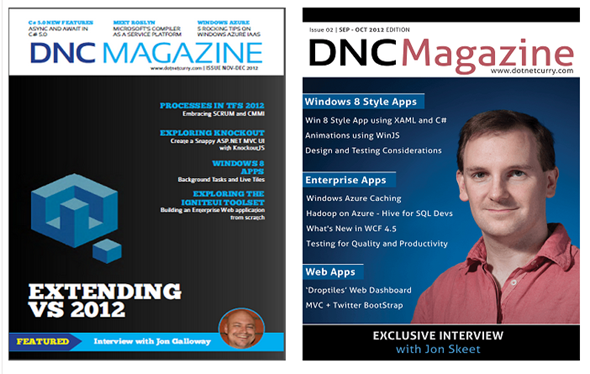
Here’s a screenshot of the magazine

image

Feel free to subscribe to this magazine and if you have any suggestions or feedback about the magazine, please drop us a mail or leave a comment.

Click here to subscribe to this free digital magazine

TechEd India 2012–Watch it Live!

TechEd India is being hosted from March 21 – 23 in Bangalore India and like every year, I will be attending this year too.  This paid event focuses on technical education to the community, coupled with deep-dive sessions, big news announcements and exploration of Microsoft tools, platforms and services.Being a Microsoft MVP gives me an easy access to Microsoft developer events locally as well as globally as well as provides an exclusive opportunity to meet the MS Product groups

Make sure you check my previous post on how to Make the Most of Technical Events like TechEd India. 

This year, TechEd has come up with a new initiative that I wanted to share with you. If you are unable to make it to the event, no worries, you can now watch TechEd Live! TechEd Live is the live online webcast of the sessions on the ground during the three days of TechEd India 2012. Get a real-time experience of the hottest action at TechEd India 2012-live streaming of keynote addresses, demos, technical tracks and more - right from the comfort of your home or office.

Best of all TechEd Live is Free to view. The agenda of the sessions can be found at the Tech Ed India site at https://india.msteched.com/TechEdLive
 
TechEd Live will also host a new track called the Channel 3. Watch out for cool and exciting content showcasing Microsoft’s platforms and technologies including Windows Phone, Azure and Windows 8, Robotics, Microsoft research, Kinect platform, making movies using Expression Blend and so on.

So stay tuned from March 21-23 as the best technical event of this year, is being covered with TechEd Live!

.NET Programming for Absolute Beginners [Free Video Series]

Channel 9 has just launched an absolute beginner programming series to help people learn to program. This FREE training series is created for programmers who have no experience with C# or VB.NET

The series of 49 episodes (24 episodes for C# and 25 for VB.NET) walks you through fundamentals, getting the .NET tools, writing C# and VB.NET code, debugging features, customizations and much more to learn concepts applicable to video games, mobile environments, and client applications

You can access the series as well as read descriptions for each episode in the link given below:


Similarly you may also want to look at the Free Learning Resources section to access .NET training videos, articles, podcasts, ebooks and much more.

SQL Server for .NET Programmers

As a programmer who has been developing data oriented .NET applications on SQL Server for over a decade now, I have become a strong believer of the fact that a programmer’s knowledge is incomplete, without having knowledge of the database and network he/she is interacting with. In my opinion, T-SQL and SQL Server Administration knowledge to some degree of depth, helps to design and develop your applications well and assists while communicating with the DBAs and admins in your organization.

I have published two link lists that I feel would help a .NET programmer to increase his/her knowledge of the SQL Server database.


Hope you find them useful!

Building Applications for Windows Phone Mango–Free Training on Aug 23/24

Microsoft MVP’s are always on the forefront when it comes to adopting and training others on the latest technologies. Rob Miles and Andy Wigley, two mobile development MVPs are conducting a FREE two-day Jump Start class which is specially tailored for developers looking to build cool applications and games for the new Windows Phone “Mango” Platform.

Since this free Live training is available only on the 23rd and 24th, please retweet and let fellow developers know about this.

Here are the details:

Dates: August 23-24, 2011
Time: 8:00am – 4:00pm PST (Use TimeZone converter to know your local time)
Duration: 8 hours/day, including hour lunch break

Course Contents:

Day One — August 23, 2011 | 8am-4pm PDT | Live online training
• Building Windows Phone Apps with Visual Studio 2010
• Silverlight on Windows Phone – Introduction
• Silverlight on Windows Phone – Advanced
• Using Expression to Build Windows Phone Interfaces
• Windows Phone Fast Application Switching
• Windows Phone Multi-tasking & Background Tasks
• Using Windows Phone Resources (Bing Maps, Camera, etc.)
 
Day Two — August 24, 2011 | 8am-4pm PDT | Live online training
• Application Data Storage on Windows Phone
• Using Networks with Windows Phone
• Windows Azure and Windows Phone
• Notifications on Windows Phone
• XNA for Windows Phone
• Selling a Windows Phone Application

Free Podcast For Developers

I love reading books but when I am travelling or commuting to and from work, I prefer listening to Podcasts or what is also known as AudioBooks. There are many podcasts available for developers, but in this post, I will share some podcasts that are FREE, interesting, regularly updated and have maintained quality over the years. Being a .NET Developer, although this list is inclined towards .NET podcasts, however there are also some good podcasts for Software Developers in general.

A podcast is a multimedia digital file made available on the Internet for downloading to a portable media player like iPod, Zune, computer, etc.

Feel free to bookmark this link and retweet and share this link with fellow developers. Here are some podcasts to tune into and keep our geekiness alive!

.NET Rocks – This is the ultimate Internet Audio Talk Show for .NET Developers. Hosted by veteran programmers Cark Franklin and Richard Campbell, this talk show is a great resource for .NET Programmers. The content, audio, usefulness and the hosts, all make it worth your time.

image


Hanselminutes – I love Scott Hanselman’s podcasts. In his own words, Hanselminutes is a weekly audio talk show hosted by Scott Hanselman and hosted by Carl Franklin. Scott discusses utilities and tools, gives practical how-to advice, and discusses ASP.NET or Windows issues and workarounds. Athough not always .NET, this talk show shares some very useful insights in a clear, understandable way.

image


Deep Fried Bytes - Deep Fried Bytes is an audio talk show with a Southern flavor hosted by technologists and developers Keith Elder and Chris Woodruff. The show discusses a wide range of topics including application development, operating systems and technology in general. Nice show on differing technologies with interesting .NET topics!

image


dnrTV - dnrTV is a natural adjunct to .NET Rocks!, allowing more technical topics to be explored in detail. As always, Carl keeps the atmosphere light and conversational, which makes for a nice way to spend your lunch hour!

image


Herding Code - Herding Code is a podcast with K. Scott Allen, Kevin Dente, Scott Koon, Jon Galloway and has some interesting topics for .NET programmers.

image


SpagettiCode - Spaghetti Code host Jeff Brand discusses events in the world of .NET development and beyond. This podcast cover a wide range of news in the world of .NET development

image


The Thirsty Developer - A podcast with Microsoft Developer Evangelist, Dave Bost and Clark Sell

image


Software Engineering Radio - Software Engineering Radio is a podcast targeted at the professional software developer and covers all topics software engineering.

image


RailCasts - RailsCasts is produced by Ryan Bates and features tips and tricks with Ruby on Rails. The screencasts are short and focus on one technique so you can quickly move on to applying it to your own project. The topics target the intermediate Rails developer, but beginners and experts will get something out of it as well.

image


5By5 - 5by5 is an Internet broadcasting network for geeks, designers, developers, entrepreneurs, and technophiles, recording live with hosts like Dan Benjamin, John Gruber, Merlin Mann, Jeffrey Zeldman, and friends.

image


The Stack Exchange Podcast – Jeff Atwood and Joel Spolsky give you an unparalleled look inside the building and running of one of the web's hottest startups: Stack Exchange. Instead of the typical podcast format, Jeff & Joel are joined by a different guest each week as they discuss the strategy and direction of Stack Exchange, the decisions they've made about the community and where things are going next.

image

Connected Show is another podcast, which although now not updated regularly, you can always find something useful to hear in the archives.

Feel free to share podcasts you have been listening to. I will update the list accordingly!

SharePoint 2010 and Azure Free Training

I had recently published a list of SharePoint 2010 Tutorials For Beginners and Intermediate Developers. If you are a developer/architect who is interested in understanding how SharePoint 2010 and Windows Azure can leverage each other, then Microsoft recently released the July 2011 update of SharePoint 2010 & Windows Azure Training Kit. The kit contains twelve modules that include PowerPoint decks, hands-on labs and source code that shows how the SharePoint 2010 platform and Windows Azure platform can work together.

Here are the modules covered in this kit:
  • Windows Azure Development Overview
  • SharePoint 2010 Development Overview
  • Getting Started with Integrating SharePoint 2010 and Windows Azure
  • Integrating Windows Azure Web Services with SharePoint 2010
  • Integrating jQuery, SharePoint 2010 and WCF Services in Windows Azure
  • Integrating Windows Azure in Office 2010 Solutions
  • Using Bing Maps in SharePoint 2010 with SQL Azure and Business Connectivity Services
  • Securing Windows Azure Services for SharePoint 2010
  • Using Windows Azure Blob Storage with SharePoint 2010
  • Azure Hosted Application Design Pattern for SharePoint
  • Using Windows Azure with SharePoint Event Handlers
  • Using Windows Azure with SharePoint Workflow

BizTalk Server 2010 Training Kit and VHD

Microsoft has released the BizTalk Server 2010 pre-configured VHD and Training Kit to help you get started with BizTalk.


As given on the site “This training kit contains a complete set of materials that will enable you to learn the core developer capabilities in BizTalk Server 2010. This five-day instructor-led course consists of a series of hands-on labs that provides students with the knowledge and skills to develop applications using Microsoft BizTalk Server. The labs focus on how to work with schemas, maps, and pipelines; process flat files; implement transactions; integrate business rules; and more. There is also an option below to download a Virtual Machine that is ready for you to use with the training kit.”

Windows Azure Sample Project - .NET Stock Trader 5 Sample Application

Ask an experienced programmer and he/she will tell you that the best way to learn a new technology is by getting some hands-on experience in it. Microsoft has released a .NET Stock Trader 5 Sample SOA application that is an end-to-end sample application illustrating Windows Azure Platform Cloud Migration and Integration and will give you a good head start as well as demonstrate how to create scalable, connected systems on the cloud, with best practices. The best part is that the application is FREE to download and study.

Here’s a sample screenshot of the application

Azure Architecture

Here are some key features of this application:
  • Highly Scalable, Cloud Connected SOA based on ASP.NET 4.0 and WCF 4.0
  • Windows Presentation Framework (WPF) desktop client
  • Migration of an on-premise application to the Windows Azure Platform
  • Best-practice programming practices for Windows Azure, SQL Azure, .NET and WCF including the use of an n-tier, service-oriented design
  • Can be deployed to a traditional server, Hyper-V private clouds or the Azure public cloud
  • Best programming practices for building high-performance and horizontally scalable applications for the cloud
  • Rich technical documentation that explain how to run and reconfigure the application, distributed caching, load-balancing, failover and much more
  • and

Visual Studio 2010 and .NET Framework 4 Training Kit–June 2011

Microsoft released the June update of VS 2010 and .NET Framework Training Kit. The Training Kit contains presentations, hands-on labs, and demos and is designed to get you up and running in no time with the following technologies including
  • C# 4
  • Visual Basic 10
  • F#
  • Parallel Extensions
  • Windows Communication Foundation
  • Windows Workflow
  • Windows Presentation Foundation
  • Silverlight 4
  • ASP.NET 4
  • Windows 7
  • Entity Framework
  • ADO.NET Data Services
  • Managed Extensibility Framework
  • Application Lifecycle Management
  • Windows Azure
Download the VS 2010 and .NET 4.0 Training Kit June Update

Microsoft Security Development Lifecycle (SDL)

As software developers, you must address security and privacy threats in your applications. There are many guidelines available of Security Development Lifecycle, but here’s nice 160 page whitepaper from Microsoft that outlines the SDL process used by Microsoft product groups for application development.


Although this document does not provide an exhaustive reference on the SDL process as practiced at Microsoft, it does addresses SDL guidance for Waterfall and Spiral development, Agile development, web applications and Line of Business application and illustrates the way Microsoft applies the SDL to its products and technologies, including security and privacy requirements and recommendations for secure software development at Microsoft.

As the document mentions:
Secure software development has three elements—best practices, process improvements, and metrics. This document focuses primarily on the first two elements, and metrics are derived from measuring how they are applied.

Office 2011 for Mac: Free Training

If you are using Office 2011 for Mac or plan to do so, then here’s some free training material for you to get up and started with Office 2011. Microsoft has released a set of training downloads (.pdf) and PowerPoint (.pptx) slides of all Office 2011 tutorials and videos.

Here are the download links:
These training can be customized for group training and you can even view them on your desktop. You can also access the same training over here too www.microsoft.com/mac/how-to

Win .NET EBooks, Training and Products in our GiveAway – 5 days left!

We are doing a $38K MegaAway of .NET Products, EBooks and Training on my other site http://www.dotnetcurry.com/.  We are doing this GiveAway to celebrate DotNetCurry’s 4th Year on the Web. There are 156 exciting prizes to be won and I want to invite all my DevCurry.com readers to participate and enter a chance to win prizes in the GiveAway. The contest will last for only 5 more days!

Here are some prizes we are giving away:

.NET Products

.NET Training
3 Annual subscriptions of Pluralsight On-Demand .NET Training

.NET EBooks
O’Reilly is sponsoring 5 copies each of the following EBooks 

There are 156 prizes to be won, so make sure you give it a shot! You may just get lucky! Click this link to participate $38K MegaAway of .NET Products, EBooks and Training

Good luck!

Win .NET EBooks and PluralSight Training in this GiveAway

My other site DotNetCurry.com is doing a GiveAway to celebrate it’s 4 year on the web. There are 156 prizes consisting of .NET Books, Software and Training and you can win them too!!

Just follow this link to enter the contest - DotNetCurry.com $38K Mega GiveAway: 4th Anniversary Celebration

Amongst the prizes, there are some cool O'reilly EBooks and Training. You can win 3 Annual Subscriptions to Pluralsight On-Demand .NET Training. Pluralsight provides high-quality training solutions for Microsoft .NET developers that can fit any schedule or budget. The revolutionary Pluralsight On-Demand! training library provides developers with instant access to a rich collection of online training courses delivered by industry authorities.

There are also 25 EBooks sponsored by O'Reilly on the latest Microsoft Technologies, for the GiveAway.

.net-ebooks-training-giveaway

Make the Most of Technical Events like TechEd India 2011

I am attending TechEd India 2011 next week (March 23 –25) and I am really excited about it! For those who are attending such events in these economically testing times, here are some pointers on how to make the most of such events.

What can you expect in conferences like TechEd?

TechEd India is a 3-day Microsoft technical paid event and focuses on technical education to the community, coupled with deep-dive sessions, big news announcements and exploring tools, platforms and services. With the focus on Azure, HTML 5, IE9, MVC, Silverlight, ASP.NET, jQuery and SharePoint 2010 this year, I am sure there’s something for everybody to learn. You also have breakout sessions, hands-on-labs, free certifications and product tents where you can interact, learn, network and get some cool merchandise. Did I mention, food and tea breaks during these 3 days are included!

And if you are a Microsoft MVP (oh talk about the benefits of being one which includes a free pass to this event!), you have an exclusive opportunity to meet the MS Product pundits, give them feedback and suggestions and get their insights. Last year, we also attended MVP parties hosted by companies like Telerik, Infragistics and PluralSight. It was great fun!

Make sure you take out time to Meet the MVP's at TechEd. We would love to interact with you!

How to Make the Most of these Events?

By preparing for these events in advance! Here are some pointers that could help you out:

Check the agenda in advance - Always make it a point to check the agenda and chalk out the sessions you plan to attend. For eg: In addition to the keynotes and meeting opportunities with the Microsoft top brass, here are some sessions I am really looking forward to:

  • Building High Performance, Interactive Visualizations Dashboards with Silverlight by Jason Beres
  • “Unexplained” of SQL Server Security by Vinod Kumar
  • jQuery and AJAX Control Toolkit: Better together for building rich web apps by Fritz Onion
  • The Top - 5 Enablers for Sustained Growth by Ranganathan S
  • “HTML5” - more than just HTML5 by Harish Vaidyanathan
  • Data Storage Services on the Cloud by Matt Milner
  • Building a real-world, Internet-scale stock trading application by Naveen Prabhu
  • Improving Application Performance with the Task Parallel Library by Fritz Onion
  • Lap around Silverlight 5 & comparative with HTML5 by Supreet Singh
  • Deep Dive: MVC Controller Architecture by Chris Eargle
  • SQL & Windows Azure: Customer Evidences from MTC by Aniruddha Deswandikar

Write notes. Don’t shy away from asking questions - Carry your laptop or a notebook to jot down notes. If a question pops up in your head during the session, make sure you note it down. If you are a gadget freak and carry a smart phone voice recording device, even better! You can avoid the time and hassle of note-taking.

With a huge attendee turnout like the ones in Teched, you may get 5 minutes or less to exchange ideas or questions with the speaker. Look at the agenda, try to gauge the content and keep your questions ready, wherever possible. In my case, my memory always fails me, so my ASUS netbook is my best companion to take down questions. By the way, did I mention it runs for a good 8 hours on batteries ;)

Focus on sharing and learning from one another - It’s always interesting to gather perspectives from fellow devs about the different technologies in the market or ask them about the project/products they are working on. Developers love sharing what and how they create. You will be surprised to learn there are so many smart devs out there. It’s a networking and learning event, so leverage your personality and be sure to take advantage of this networking opportunity.

Plan meetings or strike up a conversation – Technical events like Teched is not just about learning, it also opens doors to opportunities. So be ready to explore one when you see it. If you can, find who's attending and make a list of people you want to meet. Ask them for their time in advance for a meetup.

To strike a conversation with a prospect, the key is to feel capable and confident. Be open to introduce yourself without intruding. Be ready to answer questions like “What do you do”? Don’t talk too much about yourself. Listen intently. Also remember that you cannot talk to everyone, so go with the flow. You may or may not build up contacts, however the important thing over here is to network, meet new people and be yourself.

Business cards and Follow up – Keep your business cards ready and don’t shy away to exchange them. After the event, drop an email to the prospects you met at the event and thank them for the time.

Promotions – If you are running a blog or launching a new product, flaunt it using T-shirts, caps or any other merchandise. People will only learn about your product if you market it well.

Eat and Drink together – During conferences, make sure you eat your meal or get drinks with everyone else. This gives you a chance for informal conversation and to bond with one another. Last year, I attended MVP parties hosted by companies like Telerik, Infragistics and Plural Sight and it was good fun! To bring back some memories, here’s a picture from a TechEd party, with fellow MVP’s Ashish, Arjit, Nitin, Pinal, Suprotim and Sumit (left to right)

image

So those were some tips to help you make the most of this event. Feel free to share your tips!

I hope you’ll be attending TechEd this year and I look forward to meeting you and talk about the awesome stuff you are doing. If you are a visitor of any of our sites - DotNetCurry.com, DevCurry.com or SqlServerCurry.com, feel free to let us know how are we doing.

I will be doing a follow up post to share my experiences after I return from this event and I also plan to highlight the best tweets made during #techedin. So tweet your best!

It’s time to start packing my bags!

Visual Studio 2010 and .NET Framework 4 Training Kit – March 2011 update

Microsoft has released an update for the Visual Studio 2010 and .NET Framework 4 Training Course which includes 50 labs, 22 demos, 16 presentations and 12 videos to help you learn how to utilize the Visual Studio 2010 features and a variety of framework technologies including: C# 4.0, VB.NET 10, F#, ASP.NET 4, Silverlight 4 , Parallel computing, WCF, WF, WPF, EF 4.0, ADO.NET Data Services, VSTS and Windows Azure.

Here are some new demos included:

Silverlight 4:

  • Hands-on Lab - Migrating a Windows Forms Application to Silverlight
  • Hands-on Lab - Migrating an ASP.NET Web Forms Application to Silverlight
  • Hands-on Lab - Working with Panels, XAML and Controls
  • Hands-on Lab - Silverlight Data Binding
  • Hands-on Lab - Migrating Existing Applications to Out-of-Browser
  • Hands-on Lab - Great UX with Blend
  • Hands-on Lab - Web Services and Silverlight
  • Hands-on Lab - Using WCF RIA Services
  • Hands-on Lab - Deep Dive into Out of Browser
  • Hands-on Lab - Using the MVVM Pattern in Silverlight Applications

Windows Azure:

  • Hands-on Lab – Introduction to Windows Azure
  • Hands-on Lab – Debugging Applications in Windows Azure
  • Demo Script – Hello Windows Azure
  • Demo Script – Deploying Windows Azure Services
  • Presentation – Windows Azure Platform Overview
  • Video – What is Windows Azure?

Download Visual Studio 2010 and .NET Framework 4 Training Kit

Learn Entity Framework 4 and ASP.NET 4 – Employee Info Starter Kit

A couple of weeks ago, I had announced a tutorial series that I started on Entity Framework 4.0 Learn ADO.NET Entity Framework 4 – Free Tutorials. Tutorials are a great way to learn about a new technology, however to assert yourself as a cutting-edge web developer, you need to top up your learning with a practical approach. I appreciate the efforts of developers who take out time from their busy schedules to teach others how to work on real projects with practical, high–level application development techniques.

ASP.NET MVP Ashraful Alam is one such developer who has released an open source project called the “Employee Info Starter Kit v5.0”, which is a project template that bundles most of the new and existing features available in ASP.NET 4.0, Entity Framework 4.0 and Visual Studio 2010. This starter kit is fully documented and well tested. Here are some links:

Installation Walkthrough

Hand on Coding Walkthrough

Technical Reference

If you are an experienced developer or a beginner, I feel this series is equally valuable to both groups, providing a strong reference to one and a good introduction to the other.

Download Employee Info Starter Kit v5

PHP with IIS7 and SQL Server 2008 – Free Training Kit

Microsoft has released a free training kit that shows how to build PHP applications using Windows, IIS 7.5 and SQL Server 2008 R2.

Download the Training Kit

The Training Kit contains the following demos and hands-on-labs:

PHP & SQL Server Demos

  • Integrating SQL Server Geo-Spatial with PHP
  • SQL Server Reporting Services and PHP


PHP & SQL Server Hands On Labs

  • Introduction to Using SQL Server with PHP
  • Using SQL Server Full-Text Search and FILESTREAM Storage with PHP
  • New: Getting Started with SQL Server Migration Assistant for MySQL


PHP on Windows Hands On Labs

  • IIS 7.5 Access Control Features for PHP
  • Updated: Using IIS 7.5 Media Features in a PHP Application (Includes new exercise on how to use smooth streaming from PHP)
  • Troubleshooting PHP
  • Migrating PHP Applications to IIS 7.5

Download the PHP with IIS 7.5 and SQL Server 2008 R2 Training Kit

Windows Azure Free Training Videos

If you have been looking out to get some free training on windows azure, then this post is for you. The Windows Azure Jump Start video series is for all architects and developers interested in designing, developing and delivering cloud-based applications leveraging the Windows Azure Platform. Here are the contents of this 12-hour free windows azure video series which can be viewed online or downloaded in WMV, Mp4 or Mp3 format.

Session 01: Windows Azure Overview - This session provides an engaging overview of why the Cloud is such a popular choice for applications, and how the Windows Azure Platform is the best alternative for you and your team.

Session 02: Introduction to Compute - This session deals with options for sensitive data, considerations from a legal and regulatory perspective, and the availability of Cloud resources.

Session 03: Windows Azure Lifecycle, Part 1 - This is Part 1 of a two-part section and covers the following components of the Application Life Cycle: Design, Development, and Deployment.

Session 04: Windows Azure Lifecycle, Part 2 - This is Part 2 of a two-part section and covers the following components of the Application Life Cycle: Testing, Management, Scale and Upgrade.

Session 05: Windows Azure Storage, Part 1 - This is Part 1 of a two-part section and covers the following options for storage as well as ways to access storage when leveraging the Windows Azure Platform: Non-Relational Storage, Relational SQL Azure Storage, Blobs, Drives, RESTful web services, and Content Delivery Networks (CDN).

Session 06: Windows Azure Storage, Part 2 - This is Part 2 of a two-part section and covers the following options for storage as well as ways to access storage when leveraging the Windows Azure Platform: Queues, Tables, RESTful web services.

Session 07: Introduction to SQL Azure – This session provides an introduction to SQL Azure, including Motivation, Architecture, Working with SQL Azure and Sync.

Session 08: Windows Azure Diagnostics - This session walks users through how to perform diagnostics in the Cloud. It covers the Diagnostics Monitor, ways to collect diagnostics data, persisting data in Windows Azure Storage and common usage scenarios.

Session 09: Windows Azure Security, Part 1 - This is Part 1 of a two-part section and walks users through options for Security in the Cloud. It covers the advantages and disadvantages of Role base Identity vs. Claim based Identity and Windows Identity Framework (WIF).

Session 10: Windows Azure Security, Part 2 - This is Part 2 of a two-part section and walks users through options for Security in the Cloud. It covers Access Control Service (ACS) and Shared Access Signatures.

Session 11: Scalability, Caching & Elasticity, Part 1 - This is Part 1 of a two-part section and helps learners understand how to ensure appropriate scalability, caching and elasticity into their applications using the Windows Azure Platform. Achieving linear scale, scaling up vs. scaling out, and choosing VM sizes are covered.

Session 12: Scalability, Caching & Elasticity, Part 2, and Q&A - This is Part 2 of a two-part section and also includes some Q&A discussion covering various aspects of content from the entire course. Approaches to caching and cache storage, as well as the automation of scaling are among the topics covered