
I was writing a program where I had to resolve its fully qualified path using Environment Variables. Here’s how it is done using the ‘PATH’ Environment variable
static void Main(string[] args)
{
    // List Environment Variables
    foreach (DictionaryEntry de in Environment.GetEnvironmentVariables())
        Console.WriteLine("{0}={1}", de.Key, de.Value);

    Console.WriteLine("--------------");
    Console.WriteLine("Fully Qualified Path");
    string ext = "notepad.exe";
    string fullPath = Environment.GetEnvironmentVariable("PATH")
        .Split(';')
        .FirstOrDefault(p => File.Exists(Path.Combine(p, ext)));
    Console.WriteLine(fullPath);
    Console.ReadLine();
}
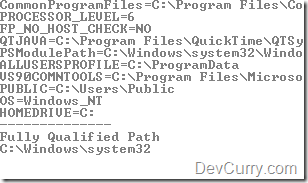
OUTPUT (partial)
Tweet
About The Author


1 comment:
Will try to follow each step - sounds interesting though
Post a Comment